
Draft Zendesk replies with AI and approve them before sending
Every new Zendesk ticket gets an AI-drafted reply that a teammate approves before it reaches the customer.
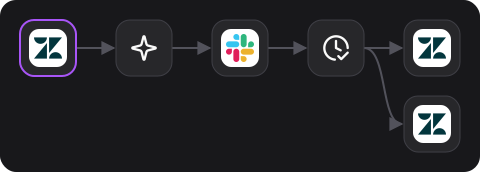
How it works
When a new ticket arrives in Zendesk, AI writes a friendly first reply and posts it in Slack for review. Someone approves or rejects it in Blokkio: an approved reply is sent to the customer and the ticket is set to pending; a rejected one is saved on the ticket as an internal note, so an agent can edit it and reply by hand.
-
New Ticket
Starts with: Zendesk
Starts for each new ticket in Zendesk.
-
Draft Reply
AI Text
AI writes a first reply to the customer.
-
Ask for Review
Slack
Posts the ticket and the suggested reply in Slack.
-
Approve Reply
Approval Gate
Waits up to a day for a teammate to approve the reply.
-
Send Reply
Zendesk
Sends the approved reply to the customer and sets the ticket to pending.
-
Save Draft as Note
Zendesk
Keeps the rejected draft on the ticket as an internal note.