
Start customer onboarding in Asana when a Pipedrive deal is won
Every deal you win in Pipedrive gets an onboarding task with a ready-made checklist in Asana, and the team hears about the win.
How it works
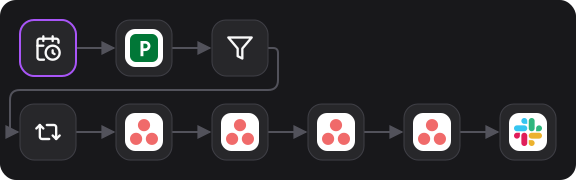
Every hour Blokkio looks for deals marked as won in Pipedrive during that hour. For each one it creates an onboarding task in your Asana project with three subtasks (kick-off call, welcome pack, account set-up), due over the next two weeks, and celebrates the win in Slack with a link to the task.
-
Every Hour
Starts with: Scheduled Trigger
Runs at the start of every hour.
-
Find Won Deals
Pipedrive
Gets won deals that changed in Pipedrive during the last hour.
-
Won in the Last Hour
Filter
Keeps only deals that were actually won this hour, so none is onboarded twice.
-
Each Won Deal
Loop
Sets up onboarding for each deal, one at a time.
-
Create Onboarding Task
Asana
Creates the onboarding task for the new customer in your Asana project.
-
Add Kick-off Call
Asana
Subtask: book the kick-off call within three days.
-
Add Welcome Pack
Asana
Subtask: send the welcome pack within a week.
-
Add Account Setup
Asana
Subtask: set up the customer's account within two weeks.
-
Tell the Team
Slack
Celebrates the win in Slack with a link to the onboarding task.