
Route webhooks to your APIs, with Slack alerts on failure
Webhooks from any tool reach the right API in the shape it expects, and Slack hears about it when one is refused.
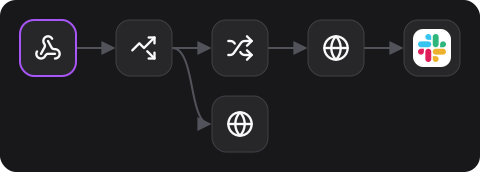
How it works
One address for all your webhooks. Order events are reshaped into the fields your orders API expects and sent there; every other event goes, unchanged, to your events API. If the orders API refuses or can't be reached, your Slack channel gets an alert with the order and the reason, so nothing is lost silently.
-
Incoming Event
Starts with: Webhook Trigger
Receives every event your tools send to this address.
-
Is Order Event?
If / Else
Sends new orders one way and every other event the other.
-
Shape the Order
Transform
Picks out the fields your orders API expects.
-
Send to Events API
HTTP Request
Passes every other event on to your events API unchanged.
-
Send to Orders API
HTTP Request
Creates the order in your system; if it is refused, the run takes the alert path.
-
Alert on Failure
Slack
Tells your Slack channel which order was refused and why.