
Escalate urgent Zendesk tickets to Microsoft Teams
AI spots urgent Zendesk tickets, marks them urgent and alerts your on-call channel in Teams with a one-hour reply target.
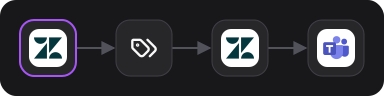
How it works
Every new Zendesk ticket is read by AI. When a customer is blocked, losing money or data, reports a security problem or threatens to leave, the ticket is set to urgent, tagged and given an internal note explaining why, and your on-call channel in Microsoft Teams gets an alert with a link and a reply-by time. Routine tickets are left alone.
-
New Ticket
Starts with: Zendesk
Starts for each new ticket in Zendesk.
-
Check Urgency
Classify
AI decides whether the ticket needs someone right now.
-
Mark as Urgent
Zendesk
Sets the ticket to urgent and notes why, for the agents.
-
Alert On-call
Microsoft Teams
Posts an urgent alert with a link and a reply-by time in Teams.