
Website uptime monitor with Slack alerts
Blokkio checks your website every 15 minutes and alerts your Slack channel when it is down or answers strangely.
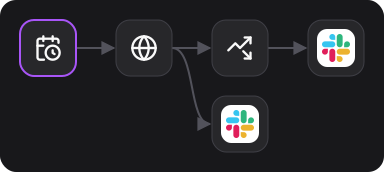
How it works
Every 15 minutes Blokkio opens your website's health or home page. If the site can't be reached or answers with an error, your Slack channel gets an urgent alert with the reason; if it answers with anything other than a plain OK, the channel gets a warning. While the site stays down you are reminded at every check.
-
Every 15 Minutes
Starts with: Scheduled Trigger
Starts a check every 15 minutes, day and night.
-
Check Website
HTTP Request
Opens your website; if it can't be reached or answers with an error, the run takes the alert path.
-
Unexpected Answer?
If / Else
Checks whether the site answered with anything other than OK (200).
-
Site Down Alert
Slack
Tells your Slack channel the site is down, with the reason.
-
Warn the Team
Slack
Tells your Slack channel the site answered, but not with a plain OK.