
Deliver a lead magnet from Typeform and grow your list
Everyone who asks for your guide in Typeform gets it by email at once, and those who opt in join your Mailchimp audience.
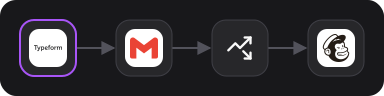
How it works
When someone fills in your Typeform to download a guide, checklist or e-book, the workflow emails them the download link from your Gmail straight away. If they ticked the box to hear from you, they are added to your Mailchimp audience with a lead-magnet tag, so your welcome series can pick them up. People who didn't opt in only get the guide.
-
Download Request
Starts with: Typeform
Runs the moment someone submits your Typeform.
-
Send the Guide
Gmail
Emails the download link from your Gmail.
-
Wants Newsletter?
If / Else
Checks whether they said yes to your newsletter.
-
Add to Newsletter
Mailchimp
Adds them to your Mailchimp audience with the lead-magnet tag.