
Follow up on customer satisfaction surveys
Unhappy survey answers become a high-priority Zendesk ticket and a Slack alert; happy customers get a thank-you email.
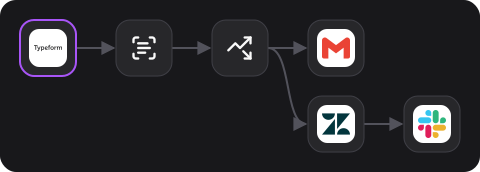
How it works
When someone answers your Typeform satisfaction survey, AI reads the answers, whatever your questions are, and works out the score, the comment and whether the customer is happy. Unhappy customers get a high-priority follow-up ticket in Zendesk and your team is told in Slack; happy customers get a personal thank-you from your Gmail.
-
Survey Response
Starts with: Typeform
Starts the moment someone submits your Typeform survey.
-
Read the Answers
Extract Data
AI pulls out the score, the comment and the email.
-
Happy Customer?
If / Else
Checks whether the customer is satisfied.
-
Thank the Customer
Gmail
Sends a short thank-you email from your Gmail.
-
Open Follow-up Ticket
Zendesk
Creates a high-priority Zendesk ticket to win the customer back.
-
Alert the Team
Slack
Tells your support channel about the unhappy customer.