
Sort support emails into Zendesk with AI
Every email to your support inbox becomes a Zendesk ticket tagged by topic, and sales questions go straight to your sales channel.
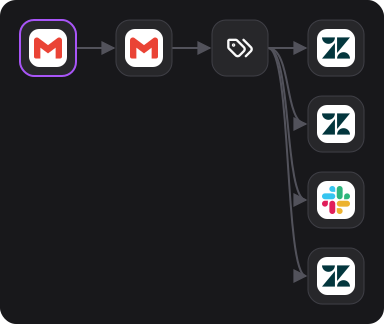
How it works
When a new email lands in your Gmail support inbox, AI reads it and decides whether it is about billing, a technical problem or a sales question. Billing and technical emails become Zendesk tickets tagged for the right team, sales questions are posted to Slack for your sales team, and anything else becomes a general ticket.
-
New Support Email
Starts with: Gmail
Starts for each new email in your Gmail support inbox.
-
Read Email
Gmail
Fetches the email's sender, subject and text.
-
Sort the Request
Classify
AI decides what the email is about.
-
Create Billing Ticket
Zendesk
Opens a Zendesk ticket tagged for the billing team.
-
Create Technical Ticket
Zendesk
Opens a Zendesk incident tagged for the technical team.
-
Pass to Sales
Slack
Posts the sales question in your sales channel.
-
Create General Ticket
Zendesk
Opens a Zendesk ticket for anything else.