
Review social posts from Notion before they go out
Every new post in your Notion content calendar gets an AI proofread and a reviewer's OK before the author is told to publish.
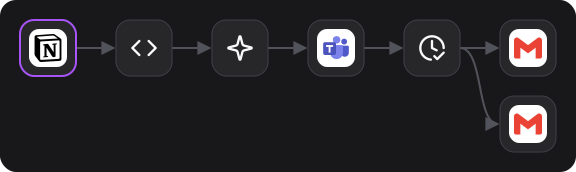
How it works
When a writer adds a post to your Notion content calendar, AI checks it for tone, clarity and spelling and suggests a polished version. The draft and the notes go to your Microsoft Teams channel, and a reviewer approves or rejects it in Blokkio. The author gets an email either way: the go-ahead with the polished text, or the changes to make. Approval steps need a paid plan.
-
New Draft
Starts with: Notion
Checks your Notion content calendar for new posts every 5 minutes.
-
Read the Draft
Code
Picks the title, text, channel and author out of the Notion page.
-
Check the Draft
AI Text
AI proofreads the post and suggests a polished version.
-
Ask for Review
Microsoft Teams
Posts the draft and the AI notes to your reviewers' Teams channel.
-
Approve the Post
Approval Gate
Waits up to two days for a reviewer to approve or reject the post.
-
Tell Author to Publish
Gmail
Emails the author the go-ahead with the polished version.
-
Ask Author for Changes
Gmail
Emails the author the AI notes so they can rework the post.