
Answer team questions in Slack from your Notion FAQ
Mention the bot in Slack with a question and an AI assistant answers in the thread, using the FAQ pages in your Notion.
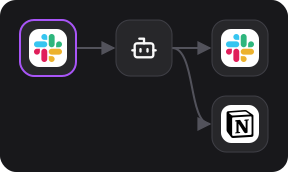
How it works
When someone mentions your Slack bot, an AI agent searches the Notion pages you share with Blokkio (your FAQ, handbook or help pages), reads the best matches and replies in the thread with a short answer and the page it came from. If the FAQ doesn't cover it, the assistant says so instead of guessing.
-
Bot Mentioned
Starts with: Slack
Starts when someone mentions your Slack bot in a channel.
-
Answer Question
AI Agent
Searches your Notion FAQ and writes a short answer.
-
Reply in Thread
Slack
Posts the answer as a reply to the question in Slack.
-
Search FAQ
Notion
Searches the Notion pages shared with Blokkio for words from the question. The assistant uses this as a tool.