
Review high-value Shopify orders before packing
Every Shopify order becomes a packing card in Trello; orders over 1,000 wait for a manager's OK first.
How it works
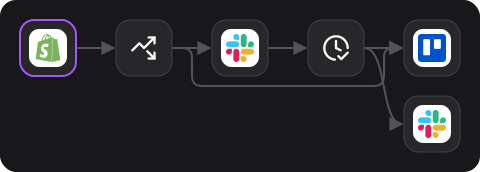
New Shopify orders get a Trello card with a packing checklist and the shipping address. Orders over 1,000 are posted to Slack and wait for a manager to approve them in Blokkio before they reach the packing board; if one is rejected, the team is told to cancel and refund it.
-
New Order
Starts with: Shopify
Checks Shopify for new orders every 5 minutes.
-
High Value?
If / Else
Checks whether the order total is over 1,000.
-
Ask for Review
Slack
Asks your team in Slack to check the order.
-
Add to Packing Board
Trello
Creates a Trello card with a packing checklist and the shipping address. Choose the list once.
-
Review Order
Approval Gate
Waits up to a day for a manager to approve or reject the order.
-
Tell the Team
Slack
Tells your team in Slack to cancel and refund the rejected order.