
Turn NPS answers into reviews and rescue unhappy customers
Fans who score you 9 or 10 are asked for a public review; unhappy customers get an AI-drafted personal reply waiting in Gmail.
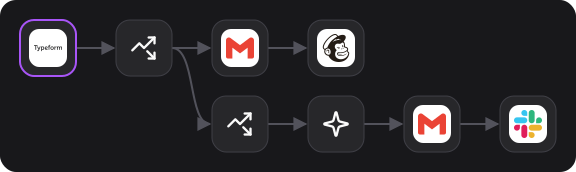
How it works
When a customer answers your Net Promoter Score survey in Typeform, the workflow looks at the score. Promoters (9–10) get a thank-you email asking for a review and are tagged in Mailchimp for your advocacy campaigns. Detractors (0–6) get a personal reply drafted by AI and saved in your Gmail drafts, and your team is alerted in Slack so someone follows up the same day. Passives (7–8) are left alone.
-
Survey Response
Starts with: Typeform
Runs the moment someone answers your NPS survey in Typeform.
-
Promoter?
If / Else
Checks whether the score is 9 or 10.
-
Ask for a Review
Gmail
Thanks the customer and asks for a public review.
-
Unhappy?
If / Else
Checks whether the score is 6 or lower.
-
Tag as Promoter
Mailchimp
Tags the customer in Mailchimp for your advocacy and referral emails.
-
Draft a Reply
AI Text
AI writes a short, personal reply to the customer's feedback.
-
Save Reply Draft
Gmail
Saves the reply in your Gmail drafts, ready to check and send.
-
Alert the Team
Slack
Tells your team in Slack so someone follows up today.