
Back up your API data to Google Drive every night
A dated JSON backup of your data lands in Google Drive every night, and Slack tells you if a backup could not be made.
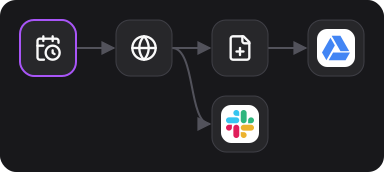
How it works
Every night at 2am Blokkio downloads the last day's records from your API, saves them as a dated JSON file (for example orders-2026-11-17.json) and uploads it to Google Drive. If your API can't be reached, your Slack channel hears about it straight away, so a missing backup never goes unnoticed.
-
Nightly at 2am
Starts with: Scheduled Trigger
Starts the backup every night at 2am.
-
Fetch Orders
HTTP Request
Downloads the last day's records from your API; if that fails, the run takes the alert path.
-
Make Backup File
Convert to File
Turns the records into a JSON file named after today's date.
-
Backup Failed
Slack
Tells your Slack channel the backup could not be made, with the reason.
-
Save to Google Drive
Google Drive
Uploads the backup file to your Google Drive folder.