
Log emailed invoices in Google Sheets with AI
Every invoice that lands in Gmail becomes a row in your Google Sheet: supplier, number, dates and amount, read by AI.
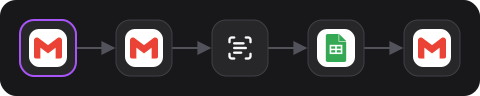
How it works
When an email with an invoice arrives in Gmail, the workflow opens it, lets AI read the invoice (the attached PDF or the email text) and adds the supplier, invoice number, dates, total and currency as a new row in your bookkeeping sheet. The email is starred so you can see it was logged.
-
New Invoice Email
Starts with: Gmail
Checks Gmail every 5 minutes for new emails that look like invoices.
-
Open Email
Gmail
Fetches the email with its text and attachments.
-
Read Invoice
Extract Data
AI reads the invoice and picks out the supplier, number, dates and amount.
-
Add to Invoice Sheet
Google Sheets
Adds the invoice as a new row in your Google Sheet. Choose the spreadsheet once.
-
Star the Email
Gmail
Stars the email in Gmail so you can see it was logged.