
Route internal help requests from Slack to IT, Facilities or HR
Requests posted in your help channel are sorted by AI: IT and Facilities get a Trello card, HR gets a private email, and the asker gets a reply.
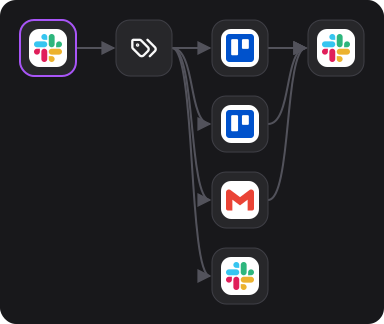
How it works
People post what they need in one Slack channel. AI reads each new message and decides who should handle it. IT and Facilities requests become cards on their Trello lists, HR matters go to HR by email (so they don't sit on a shared board), and the person gets a reply in the thread. Unclear messages get a friendly request for more detail.
-
New Help Request
Starts with: Slack
Checks your help channel in Slack for new messages every five minutes.
-
Sort Request
Classify
AI decides whether IT, Facilities or HR should handle the request.
-
Create IT Card
Trello
Adds the request as a card on the IT team's Trello list.
-
Create Facilities Card
Trello
Adds the request as a card on the Facilities team's Trello list.
-
Email HR
Gmail
Sends HR matters to the HR inbox privately instead of a shared board.
-
Ask for Details
Slack
Asks for a bit more detail when the request fits no team.
-
Reply in Thread
Slack
Tells the person which team has their request.