
Get a daily AI digest of your unread Gmail
Each weekday morning an AI assistant reads your unread email and sends you one short digest: what needs you today, and what can wait.
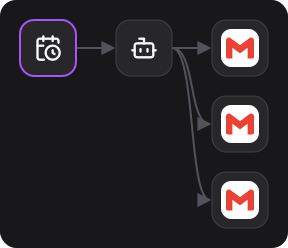
How it works
Every weekday at 8:00 an AI agent looks through the emails that arrived in your Gmail inbox in the last day and are still unread. It opens the ones that look important, then writes a digest: items that need an answer or action first (with deadlines), then a one-line mention of everything else. The digest is emailed to you; nothing in your inbox is changed.
-
Every Weekday 8am
Starts with: Scheduled Trigger
Starts the digest every weekday at 8:00.
-
Write Digest
AI Agent
Finds your unread email, reads the important ones and writes the digest.
-
Send Digest
Gmail
Emails the digest to you.
-
Find Unread Emails
Gmail
Lists the unread emails that arrived in your inbox in the last day. The assistant uses this as a tool.
-
Read Email
Gmail
Opens one email (its sender, subject and text) by its email ID. The assistant uses this as a tool.