
Draft Gmail replies with AI and send them after your approval
AI writes a reply to every email that needs one; you approve it with one click, or it waits in your Gmail drafts for you to edit.
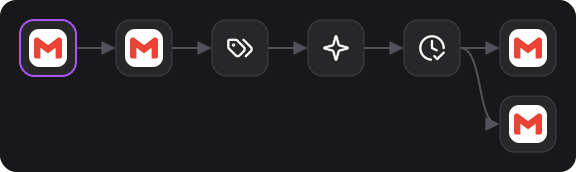
How it works
Blokkio checks your Gmail inbox every few minutes. AI sorts each new email: newsletters, notifications and receipts are left alone. For emails from people who expect an answer, AI drafts a friendly, short reply and the run waits for your approval. Approve it and the reply is sent in the same thread; reject it and the draft is saved in Gmail so you can rewrite it yourself.
-
New Email
Starts with: Gmail
Checks your Gmail inbox for new emails every 5 minutes (promotions and social are skipped).
-
Read Email
Gmail
Gets the email's sender, subject and text.
-
Needs a Reply?
Classify
Decides whether a person is waiting for an answer.
-
Draft Reply
AI Text
Writes a short, friendly reply in the sender's language.
-
Approve Reply
Approval Gate
Waits up to a day for you to approve or reject the drafted reply.
-
Send Reply
Gmail
Sends the approved reply in the same Gmail thread.
-
Save as Draft
Gmail
Keeps the rejected reply in your Gmail drafts so you can rewrite it.