
Run an offboarding checklist with ClickUp, Outlook and Teams
When someone leaves, IT gets an offboarding checklist, an exit interview is booked, the manager gets a handover email and HR hears in Teams.
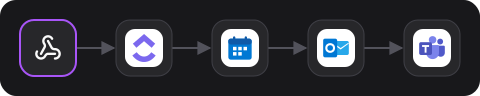
How it works
HR sends the leaver's details once. Blokkio creates an offboarding task in ClickUp with the full checklist (access, equipment, final pay) due on the last day, books an exit interview with a Teams link two days before, emails the manager a handover list from Outlook, and posts a summary in your HR channel in Microsoft Teams.
-
Leaver
Starts with: Webhook Trigger
HR sends the details of each person who is leaving.
-
Create Offboarding Checklist
ClickUp
Creates an offboarding task for IT in ClickUp, due on the last day.
-
Book Exit Interview
Outlook Calendar
Invites the leaver to a 30-minute exit interview (with a Teams link) two days before they go.
-
Email Handover List
Microsoft Outlook
Sends the manager a handover list for the last weeks.
-
Tell HR in Teams
Microsoft Teams
Posts a summary in your HR channel in Microsoft Teams.