
Post a daily AI digest of open Zendesk tickets to Slack
Every weekday morning your team gets a short Slack summary of open Zendesk tickets: what's urgent, what's recurring and what's waiting.
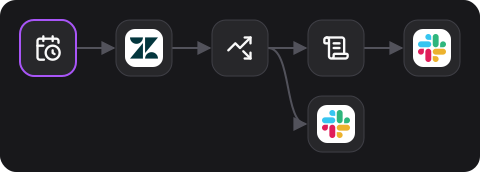
How it works
Each weekday at 9am the workflow collects every unsolved Zendesk ticket and AI turns them into a short digest: urgent issues first, problems several customers report, and tickets that have waited longest. The digest is posted in your support channel; on a day with no open tickets, the channel gets an all-clear instead.
-
Every Weekday at 9am
Starts with: Scheduled Trigger
Starts every Monday to Friday at 9am.
-
Find Open Tickets
Zendesk
Collects every ticket that isn't solved yet.
-
Any Open Tickets?
If / Else
Checks whether there is anything to report.
-
Summarize Tickets
Summarize
AI writes a short digest of the open tickets.
-
Post All Clear
Slack
Lets the team know there are no open tickets.
-
Post Digest
Slack
Posts the digest in your support channel.